Nestra from homepage to checkout process

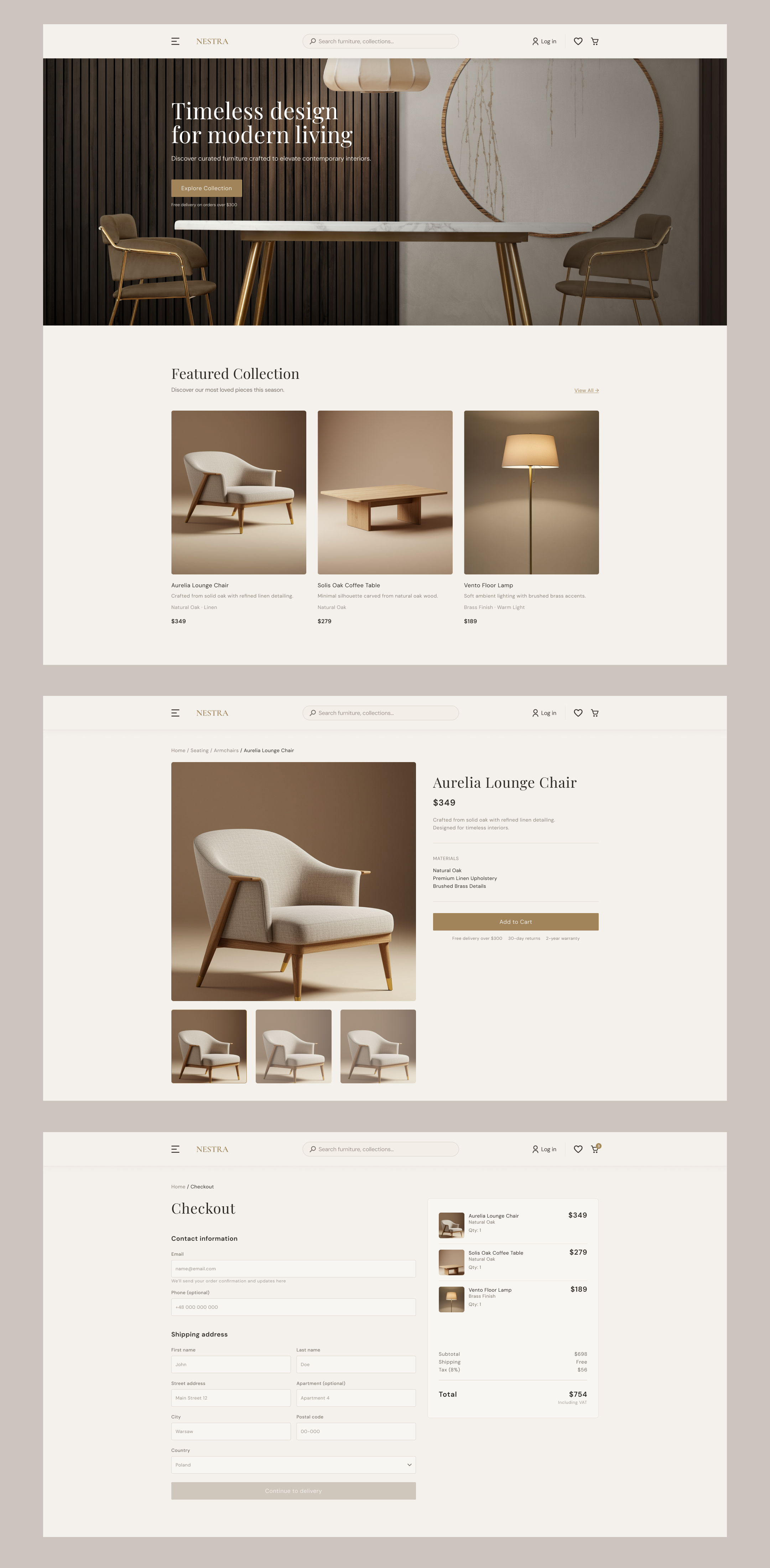
Checkout Flow Design – Decision-Making Process & Rationale
1. Platform & Device Choice
For this project, I chose a desktop e-commerce experience for a premium furniture brand (Nestra).
The decision was based on:
- Furniture purchases are considered, high-value decisions.
- Users often browse and complete purchases on desktop when buying home products.
- Desktop allows better use of whitespace, visual hierarchy, and trust-building elements.
The design emphasizes calmness, clarity, and premium aesthetics to reflect the brand positioning.
2. Overall Checkout Strategy
I designed a two-column checkout layout:
- Left side → User input (contact & shipping)
- Right side → Order summary (sticky overview)
This structure supports:
- Constant visibility of pricing (reduces anxiety)
- Transparency of costs
- Reduced cognitive load (clear separation of action vs. information)
The goal was to make the checkout feel structured and predictable.
3. Friction Reduction Decisions
Clear Sectioning
The checkout is divided into:
- Contact Information
- Shipping Address
- (Next step) Delivery
- (Next step) Payment
This progressive structure prevents overwhelming the user.
Disabled Primary Button
The “Continue to delivery” button remains disabled until required fields are completed.
Rationale:
- Prevents avoidable errors
- Signals what is required
- Guides users through a linear flow
4. Microcopy Strategy
Microcopy was intentionally added to reduce uncertainty and build trust.
Examples:
- Under Email:
- “We’ll send your order confirmation and updates here.”
- → Clarifies purpose and reassures the user.
- Under Total:
- “Including VAT”
- → Ensures pricing transparency and avoids hidden-cost anxiety.
The tone is neutral, informative, and unobtrusive — aligned with a premium brand voice.
5. Visual Hierarchy & Typography
The hierarchy follows a clear pattern:
- Page title (Checkout) — serif, large, premium feel
- Section titles — medium weight
- Labels — subtle but readable
- Microcopy — smaller, lower contrast
- Total price — highest emphasis in summary
Spacing was designed using consistent vertical rhythm to create breathing room and reduce visual stress.
The UI avoids excessive color usage.
Primary brand color is reserved for actionable elements (buttons, badges).
6. Trust & Transparency Signals
To evoke trust:
- Persistent order summary
- VAT clarity
- Visible shipping cost
- Clean, distraction-free layout
- No unnecessary promotional elements in checkout
The experience is calm and intentional — avoiding aggressive sales patterns.
7. User Flow Logic
The intended flow:
- User adds product to cart
- User enters checkout
- Contact information
- Shipping address
- Delivery method
- Payment
- Confirmation
Each step narrows focus and reduces cognitive overload.
8. Design Principles Applied
- Minimalism over complexity
- Clarity over decoration
- Transparency over persuasion
- Predictable flow over dynamic shortcuts
The objective was to create a friction-free, trust-driven checkout that feels aligned with a premium furniture brand.
Reviews
4 reviews

Really lovely project, Dawid!
The colour scheme is beautiful and nails the luxury feel. The photography choices feel cohesive with the brand too.
A few things to push it further:
- The task was to design a checkout page, so it would be great to see the full flow including different states, the payment screen, and a confirmation step.
- On the checkout screen, it's worth adding express payment options like Shop Pay or Google Pay. A lot of users prefer these and they speed things up by skipping manual address entry.
- For accessibility, double-check the contrast on your body copy and inactive button states. It's also worth reconsidering placeholder text in form fields since it tends to add cognitive load rather than reduce it.
Hope this helps!

Hey Dawid,
Visually, I think you did a really nice job adapting the website to this type of product. The color palette and typography work well together and create a cohesive feel.
I do wish you had developed the checkout flow a bit more, especially since that seems to be the main focus of the brief. It feels like more attention went into the overall aesthetic than into the checkout experience itself. Since that’s the core interaction, it would be great to see it explored in more depth.
I also agree with Anastasia’s comments, she raised some very strong points. If you refine the checkout flow a bit further, this could turn into a really solid project overall.

The project makes a good first impression. A cohesive color palette, plenty of breathing room, and clear visual hierarchy all build the premium brand feel. The two-column checkout with a sticky order summary works well, it's a classic pattern that genuinely reduces purchase anxiety.
The microcopy under the email field and the "Including VAT" note are details that show mature, user-centered thinking. I also agree with comment on contrast - light grey text on a beige background may not pass WCAG AA, worth checking with a tool like Stark or Colour Contrast Analyser.
I'm missing the cart view and form validation states, but I understand the project is still in progress. One thing I'd reconsider: a disabled button with no signal about what's blocking it can be frustrating. A bit of inline validation or a tooltip would give the user a clear direction.
This is solid, thoughtful work with a clear vision for the brand and the flow. It's evident that design decisions are intentional, not accidental and that's exactly what we're looking for at this stage. Polish the accessibility and interactive states, and this project will be truly portfolio-ready! 💪

The page looks modern and clear. I like how easily I can get to the checkout, and the information about delivery, warranty, and returns is placed perfectly. In high-ticket e-commerce like furniture, trust and "reassurance copy" are the biggest drivers of conversion. Providing this data upfront helps buyers make informed decisions more quickly and reduces anxiety about large purchases.
Here are a few things to improve:
- Login Strategy & Retention: I recommend adding a login suggestion or a "Save my details" option at checkout. While guest checkout is great for speed, a login helps the user auto-fill data for future visits and allows them to track their delivery process easily. This simple addition can significantly improve customer lifetime value and long-term retention.
- Price Transparency: You should add information about taxes directly on the product page, just as you did with the delivery price.
- The effect: Unexpected costs at the final step are the #1 cause of cart abandonment. Showing the "all-in" price early avoids negative surprises and builds much more trust with the buyer.
- Technical Accessibility: Please check the contrast and font size across the site, especially the light grey text on the beige background. Improving this will ensure the site meets WCAG standards and is readable for all users, regardless of their device or lighting conditions.
To help you think deeper about the flow: How might we use the "Materials" section on the product page to tell a story about the quality and sustainability of the furniture?
You might also like

Improving Dating App Onboarding: A/B Test Design

FORM Checkout Flow - Mobile


A/B Test for Hinge's Onboarding Flow


Accessibility Asse


The Fitness Growth Engine


Uxcel Halloween Icon Pack

Interaction Design Courses

UX Design Foundations


Introduction to Figma

Design Terminology
