Cap styles
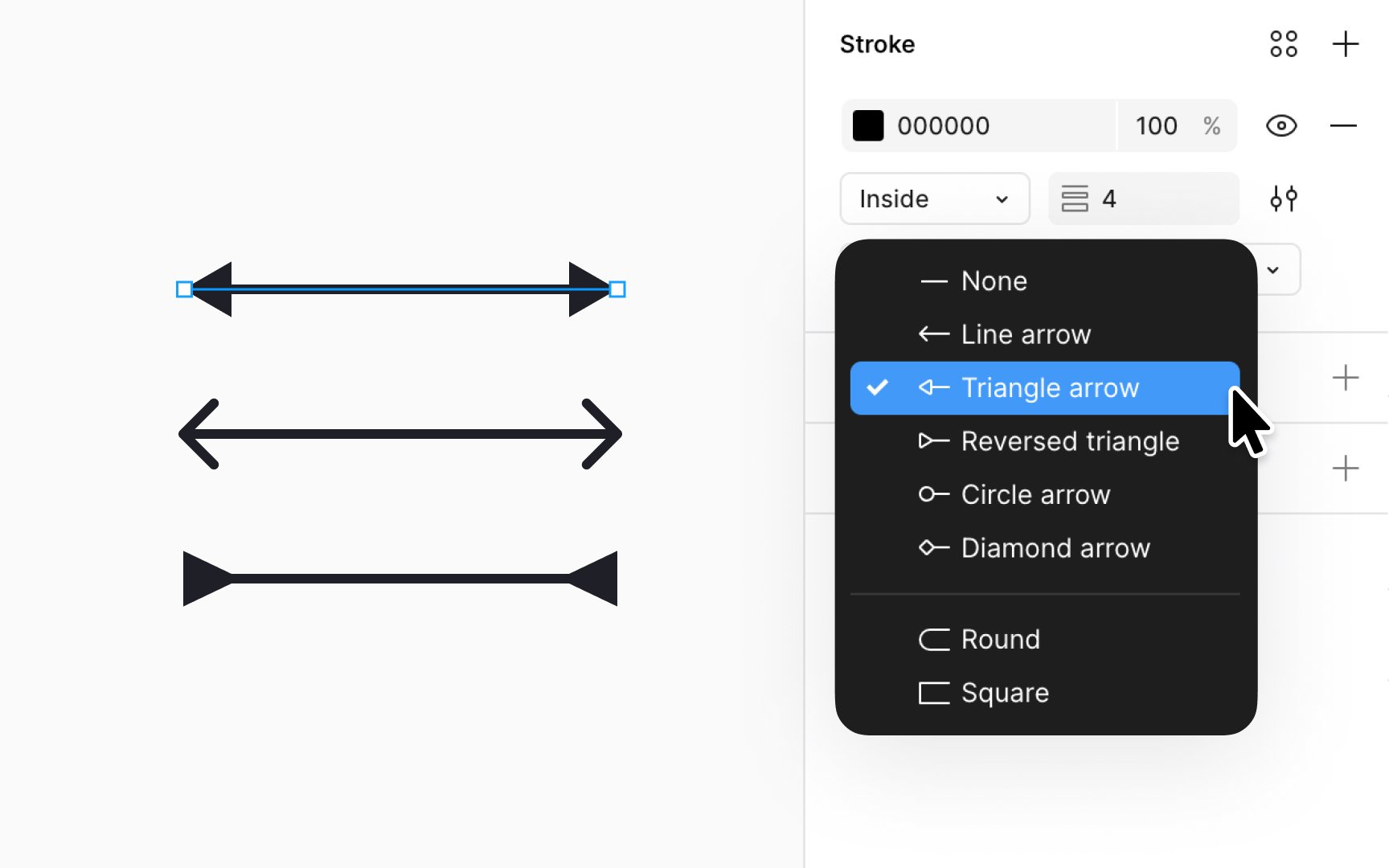
Cap styles add a finishing touch to your vector paths, each offering a distinct visual effect:
- None: Ends the path abruptly with a squared finish, adding no extra length.
- Line arrow: Places two 45-degree lines at endpoints, mirroring the path's stroke weight. Arrow length is fixed.
- Triangle arrow: Attaches a triangular arrowhead at both ends. For a single arrowhead, enter vector edit mode.
- Reverse triangle: A Triangle Arrow pointing inward, giving an introspective flair to your path.
- Diamond arrow: Ends the path with a solid, impactful diamond shape.
- Round (default): Softens the path's end with a semi-circular cap, half the stroke weight.
- Square: Extends the path's end squarely, adding a cap half the stroke weight.
These styles are versatile. Use line arrows for directional flow in user journey maps, triangle arrows for attention in instructional graphics, round for a gentle finish in decorative elements, or square for a structured, geometric look in technical diagrams.
Top contributors