Governance Principles in Design Systems
Establish clear rules and shared processes that keep a design system consistent, scalable, and trusted.
Governance gives a design system its structure. Without shared rules and predictable decision paths, even the most polished components lose their value as teams create one-off solutions or silently patch gaps on their own. Governance keeps the system usable by guiding how decisions are made, who participates, and how changes flow from ideas to released components.
Good governance is not about control. It builds clarity through defined roles, simple contribution rules, regular communication, and transparent documentation. Governance also supports the system’s growth. When needs evolve, teams can request updates, propose improvements, or share edge cases using clear steps.
Governance gives everyone the same understanding of how to contribute, how decisions happen, and how updates move forward. This shared structure helps the system stay reliable over time and builds trust across teams.
A
Governance provides a structured way to prevent this drift. It gives teams a clear path to follow when a component is missing or does not meet a requirement. Reaching out to the design system team helps teams understand whether an existing component fits their needs or whether new work should begin. This process supports alignment and reduces duplication.
A governance model also encourages open communication about edge cases. When these situations are shared, other teams do not have to solve the same problem on their own. This reduces repeated work and keeps the system coherent as it evolves with new use cases.[1]
Clear roles help teams understand how to take part in a
Many organisations rely on a dedicated design system team. This team updates components, improves
Good governance also creates space for shared contributions. Teams are encouraged to submit enhancements, share issues, and suggest improvements. This helps reveal gaps and challenges that the core team might not notice on their own because other teams work in different contexts.[2]
Contribution and support flows guide teams on how to ask for help or suggest changes. When these paths are unclear, people are unsure where to go or whom to contact. Simple steps make this easier. Teams can use shared channels like Slack or an issue tracker to report a problem, ask a question, or say that a component is missing. This gives everyone a predictable place to start.
These flows also help the
A good contribution flow also makes information visible to all teams. When edge cases, questions, and potential improvements are recorded in one place, others can learn from them instead of solving the same problem on their own. This builds shared ownership and strengthens trust across the organization.
Pro Tip: Use one shared place for questions and suggestions so teams always know where to go.
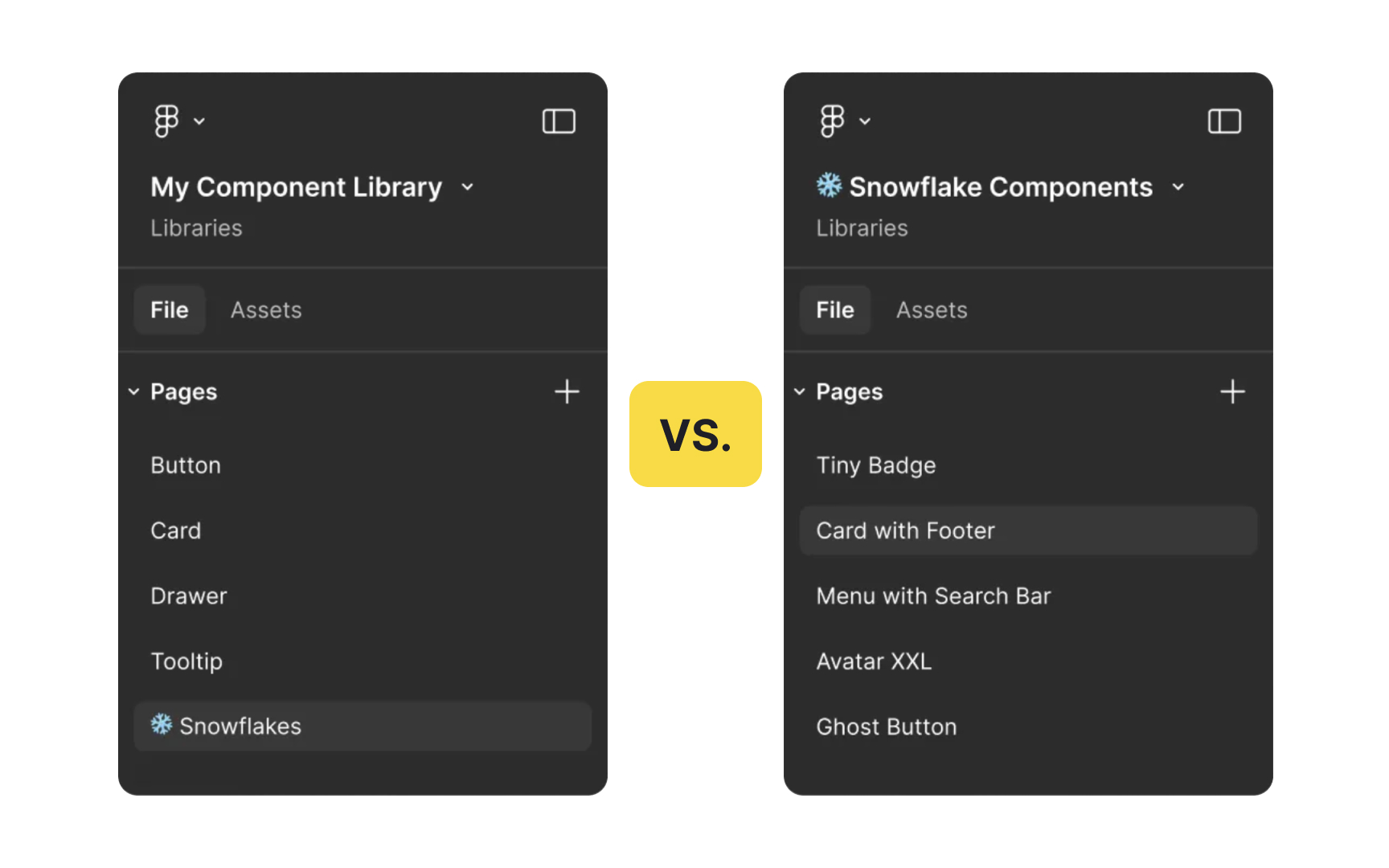
When new work is needed, teams must decide whether the solution belongs in the
A system component, on the other hand, is useful across many products or situations. It may be a new component or a variation of an existing one. If a component is expected to help multiple teams in the future, it should be added to the design system backlog. This ensures it can be designed, reviewed, tested, and documented in a consistent way.
Deciding between these two paths helps teams prioritise their work. Product teams often own snowflake components because they serve a narrow need. The design system team usually leads work that affects the wider system. This shared understanding makes planning easier and ensures that the system evolves with intention rather than by accident.[3]
Reviews and approvals help teams understand whether a new component or variation is ready to move forward. Each step helps teams stay aligned and avoid surprises later:
- Share an initial concept. A simple sketch or prototype shows the
use case and gives both teams a clear starting point. - Review and adjust. Teams check whether the concept meets all needs. Missing parts are updated and reviewed again until the direction is solid.
- Build the component. The
design system team creates the detailed design and code. They follow system guidelines to keep quality and consistency high. - Test in real conditions. The component is tested for content, accessibility, browsers, devices, screen sizes, and edge cases. Internal design and code reviews help catch issues.
- Meet for final approval. Both teams review the finished work. If it no longer matches the original goals, it is refined again before signoff.
This path keeps communication open and ensures the final component fits real product needs.
Pro Tip: Keep each step small and focused so teams can fix issues early.
Good documentation also supports quality. Shared standards help teams build components that look and behave the same way across products. This includes rules for colors, typography, spacing, and technical expectations in code. Clear standards reduce confusion, speed up onboarding, and make it easier to maintain consistency as the system grows and changes.
Strong documentation also improves communication. When updates or changes happen, teams can quickly understand what was added, removed, or adjusted. This helps the design system team share decisions with the whole organization and keeps everyone informed without extra meetings or long explanations.
Pro Tip: Keep documentation clear and centralized so teams spend less time searching for answers.
Version control helps teams track changes in the
Planned release cycles also support trust. When new components or improvements move through the development branch and are grouped into a scheduled release, product teams can prepare for what is coming. They can pull the new version into their environment, test it, and report any issues. This shared rhythm makes it easier for teams to adopt updates without disrupting their work.
Pro Tip: Use consistent versioning so teams understand the size and impact of every change.
Measuring how teams use the
Impact metrics also highlight the efficiency gains a design system can deliver. Changes in development time, reduced rework, and improvements in product quality are all valuable signals. Tracking these trends helps teams understand whether the system is speeding up delivery and reducing duplicated effort. It also supports long term planning by showing where investments in the system bring the most benefit.
Pro Tip: Track usage regularly so you know where the system helps most and where it needs extra support.
Governance is not a fixed set of rules. It evolves as products, teams, and priorities change. Reviewing the process regularly helps identify when steps no longer work well or when people feel blocked. When teams feel frustrated or start working around the system, it is often a sign that parts of the governance model need updating. Adjustments keep the system healthy and prevent it from becoming rigid.
Adaptability also supports teams at different stages of maturity. Governance guidance can be set early, even before a
Changing governance based on real feedback maintains trust. When teams see that their challenges lead to improvements, they stay engaged and continue using the system instead of creating their own solutions.


Similar lessons

Anatomy of UI Components
Atomic Design by Brad Frost