Personal Wellness Dashboard

Detailed Explanation
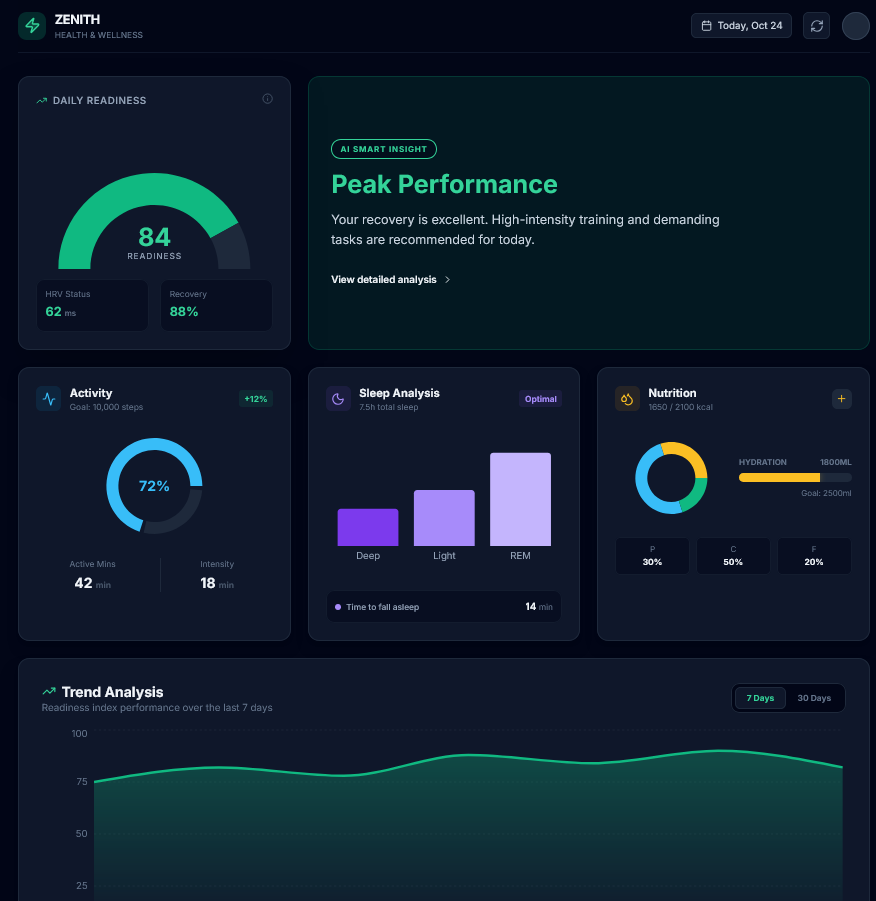
VitalTrack is a health-intelligence interface that consolidates fragmented data from wearables and manual logs into a single view. It solves "data fatigue" by converting raw metrics into a Readiness Score, moving the user experience from passive tracking to active decision-making.
The dashboard follows a 3-tier hierarchy:
- A primary "Readiness" gauge for instant status recognition.
- Three core modules (Activity, Sleep, Nutrition) that visualize the "why" behind the score.
- Contextual nudges that suggest specific behaviors (e.g., "Hydrate now") based on data gaps.
Reviews
3 reviews

I just checked out your Personal Wellness Dashboard and honestly, it feels calm in a good way. It doesn’t scream for attention, which is kind of perfect for something related to wellness. The layout feels breathable and not overwhelming.
I like how the information is organized it looks easy to scan without feeling too “data heavy.” Wellness apps can get messy with charts and metrics, but yours feels balanced and human.
If I’d suggest anything, maybe push the emotional layer a bit more. Like, how does it make the user feel when they open it? A small motivational touch or more personality could make it even stronger. But overall, nice clean work it feels thoughtful and intentional.

A personal wellness dashboard visualizes key health metrics like steps, sleep, and nutrition in a clean, goal-oriented interface with charts and bold KPIs for quick insights.
Overall, it's a strong, modern design with good visual hierarchy and personalization potential, scoring high on engagement but needing tweaks for accessibility and mobile optimization.
Strengths
- Clear Hierarchy and KPIs: Top-left readiness gauge (84%) draws eyes first, followed by AI insights and modular cards, aligns with F-pattern scanning and limits to ~9 views.
- Visual Encoding: Color-coded gauges/bars (green for excellent, purple for sleep) and trend line make data scannable; consistent sizing aids comparison.
- Branding and Theme: "Zenith Wellness" logo, dark mode with wellness greens evokes calm/professionalism, suitable for fitness tracking.
Top wellness dashboards in 2026 include Ultrahuman, Whoop, Oura Ring app, Apple Health, and Personify Health, praised for AI-driven personalization and holistic metrics beyond basics like steps/sleep.

Really clean work 👌
The dashboard feels calm and premium, and the data is easy to scan without feeling overwhelming.
I like how the main insight is highlighted at the top. Maybe the primary action could stand out a bit more. Overall, solid work.
You might also like

Smartwatch Design for Messenger App


Bridge: UI/UX Rebrand of a Blockchain SCM Product


Pulse Music App - Light/Dark Mode


Monetization Strategy


Designing A Better Co-Working Experience Through CJM


Design a Settings Page for Mobile
Visual Design Courses

UX Design Foundations


Introduction to Figma

Design Terminology
