Sign-in page for SaaS

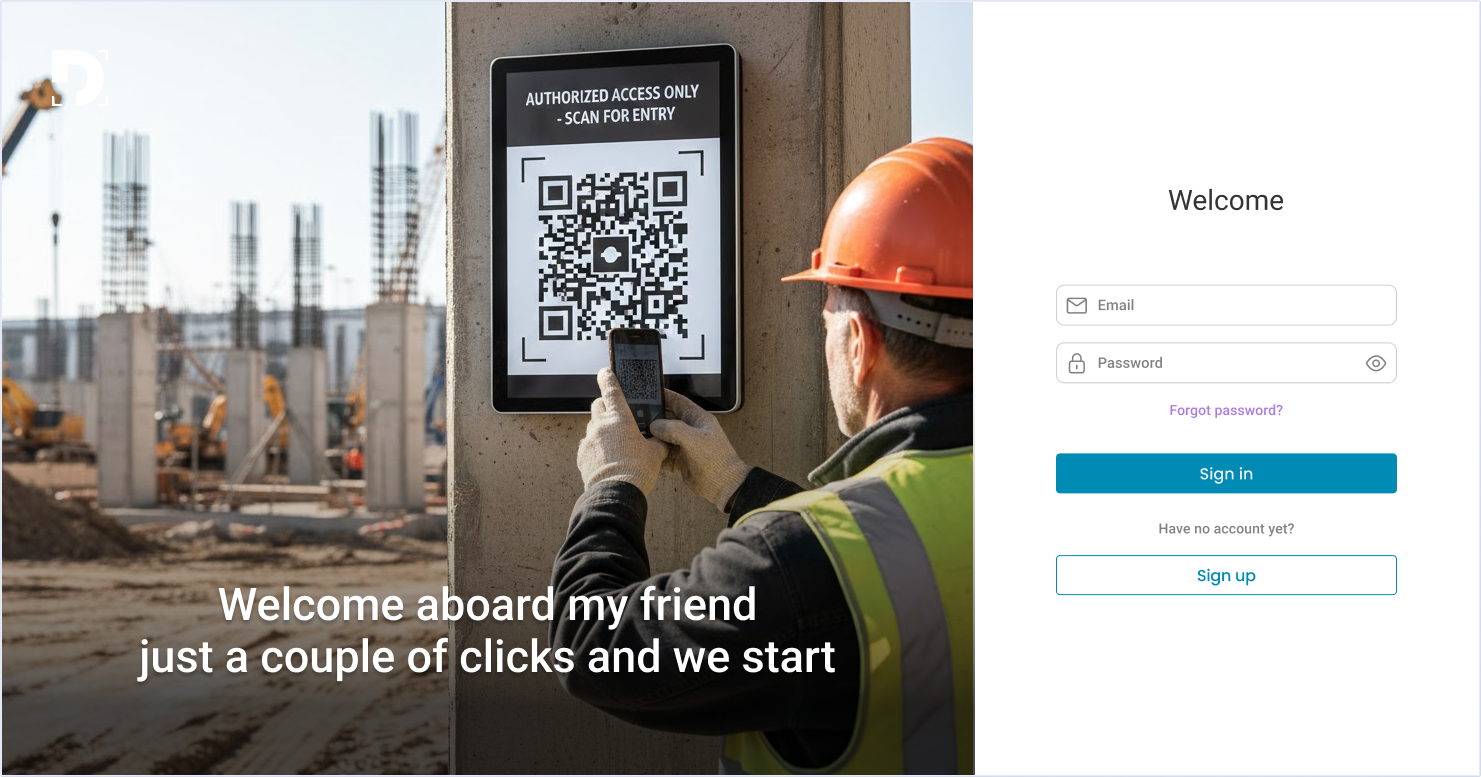
Clear product context
The visual instantly shows this is a QR-based, workplace attendance system.
Built-in trust signals
“Authorized access” and an industrial setting communicate security and enterprise use.
Low cognitive load
The layout separates context from action, making the task easy to complete.
Guided user behavior
“Sign in” is primary, signaling an existing user base and controlled access.
Minimal friction to proceed
Short form, friendly tone, and clear CTA reduce hesitation and speed up action.

Reviews
0 reviews
This project hasn’t been reviewed yet
Share your expertise with the Uxcel community by providing a review of this project. Not only will you help others, but you will also enhance your leadership skills.
0 Claps
Average 0.0 by 0 people
You might also like

Project
Designing A Better Co-Working Experience Through CJM

Project ContextThis project focuses on improving the experience of individuals using co-working spaces. The objective is to identify key pai

Project
Monetization Strategy

This project evaluates two monetization models (freemium and paid) for a new mobile point-and-click adventure game. It compares their streng

Project
Zoom Sign in Screen

Designing a WCAG-Compliant Login Screen for Zoom — Here's What I Did & Why Perceivable — Persistent labels above each field (never placehold

Project
Button System for Mobile Web Platforms Brief

For this Project I decided that my tech platform would be for a medical company. I chose different shades of blue, grey and white to convey

Project
Jakarta Running Fest 2024 Website

Jakarta Running Fest 2024 is the official event website developed after the rebranding of Jakarta International Marathon (JAKIM). The platfo

Project
Bosta UX Audit

Bosta's Create Order flow is a high-frequency task repeated dozens of times daily by merchants — but the original experience had 3 steps, re
Visual Design Courses

Course
UX Design Foundations

Learn UX design fundamentals and principles that create better products. Build foundational knowledge in design concepts, visual fundamentals, and workflows.

Course
Introduction to Figma
Learn essential Figma tools like layers, styling, typography, and images. Master the basics to create clean, user-friendly designs

Course
Design Terminology

Learn UX terminology and key UX/UI terms that boost collaboration between designers, developers, and stakeholders for smoother, clearer communication.