Rework Proton Mail

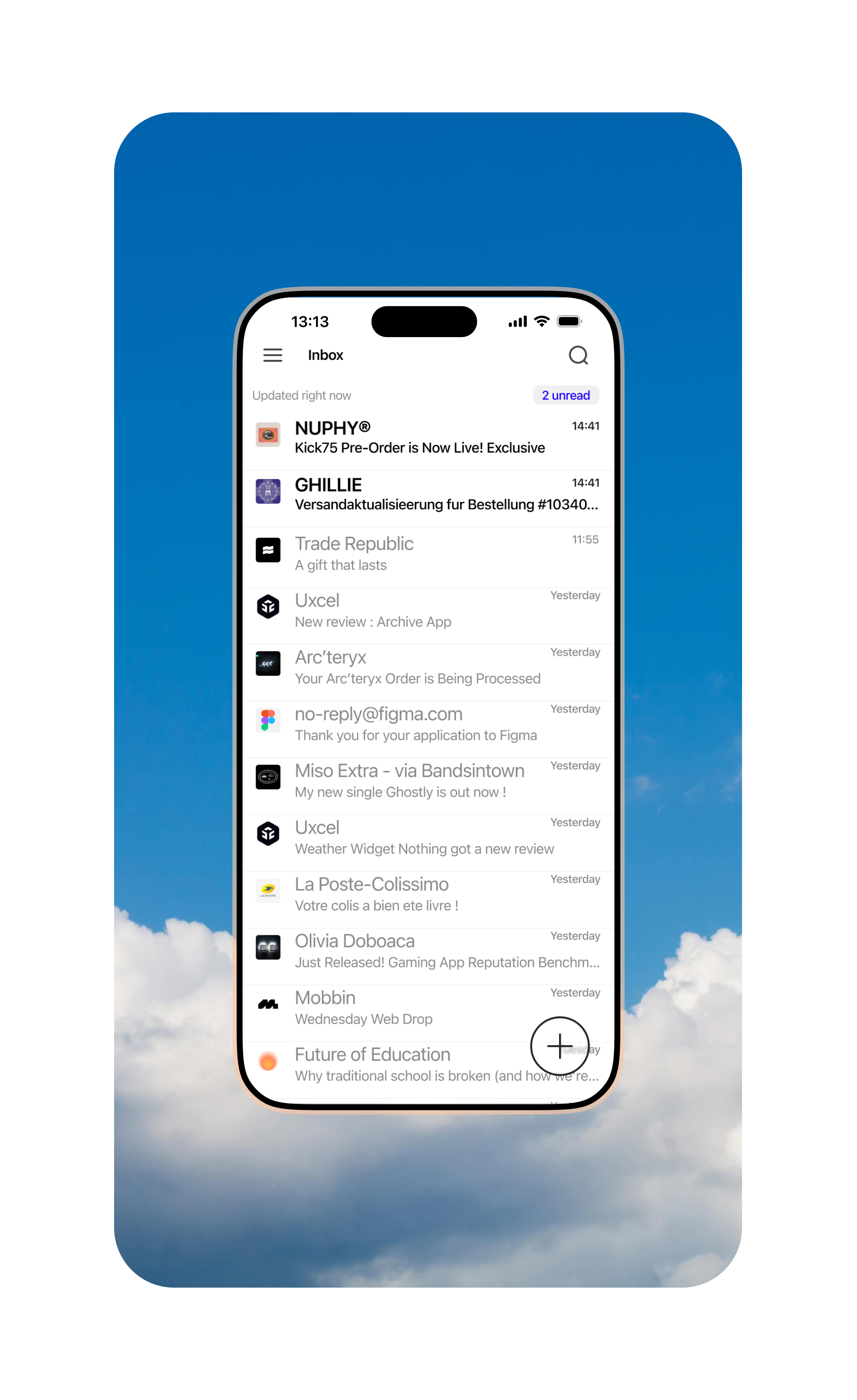
I’ve always felt that Proton Mail’s “New Mail” button wasn’t ideally placed—it’s too high on the screen, making accessibility difficult. So, I decided to do a slight redesign, adding a more accessible button that’s easier to reach with one hand.
This exercise also gave me the opportunity to experiment with rebuilding an interface.
Tools used
Share
Reviews
1 review

Hey! This is a good starting point! But i believe yiur design could benefit from a little more breathing room. 🤔 Try adjusting the spacing and padding to declutter the layout and improve readability.
For the floating button, a solid, contrasting background would make it much more visible.
2 Claps
Average 2.0 by 1 person
You might also like

Project
SONZ - Entertainment platform

The next-generation entertainment platform will allow its users not only to browse the trending songs and visuals but also to create their o

Project
Camp & Travel Explorer - App Design

Hey Uxcel Community, Most travel apps focus on destinations. This one focuses on the experience. Camp & Travel Explorer is a real client pr

Project
Solar system Dashboard Utility


Project
Signup page for a SaaS website

1. 44×44px touch targets All interactive elements fields, buttons, and the password visibility toggle meet the 44px minimum tap target. This

Editors’ Choice
Project
Uxcel Halloween Icon Pack

🎃 Introducing the Uxcel Halloween Icon Pack! 🎃 This custom Halloween-themed icon set was created to enhance the seasonal user experience o

Project
PLANTIST

A vibrant online marketplace where plant lovers can buy a diverse range of plants, gardening tools, and accessories. Our platform is designe
Popular Courses

Course
UX Design Foundations

Learn UX design fundamentals and principles that create better products. Build foundational knowledge in design concepts, visual fundamentals, and workflows.

Course
Introduction to Figma
Learn essential Figma tools like layers, styling, typography, and images. Master the basics to create clean, user-friendly designs

Course
Design Terminology

Learn UX terminology and key UX/UI terms that boost collaboration between designers, developers, and stakeholders for smoother, clearer communication.